Add a Professional Blog to Your Product, Effortlessly
BlogForge is a production-ready, multi-tenant blogging platform that plugs into your existing site with signed APIs, direct login links, and tenant-safe sessions. Give every team a complete publishing workflow - structured content, role-based administration, moderation, analytics, and fully branded, themeable tenants - without slowing your developers down.
Runs on your own domain or subdomain. No infrastructure to manage.
Built to rank, right out of the box
Every post ships with built-in SEO metadata, so your content is ready for search engines the moment it's published.
A Content Dashboard Built for Real Teams
Manage content with a modern, intuitive dashboard powered by Filament PHP - built for creators, editors, and admins who want power and simplicity in one place.
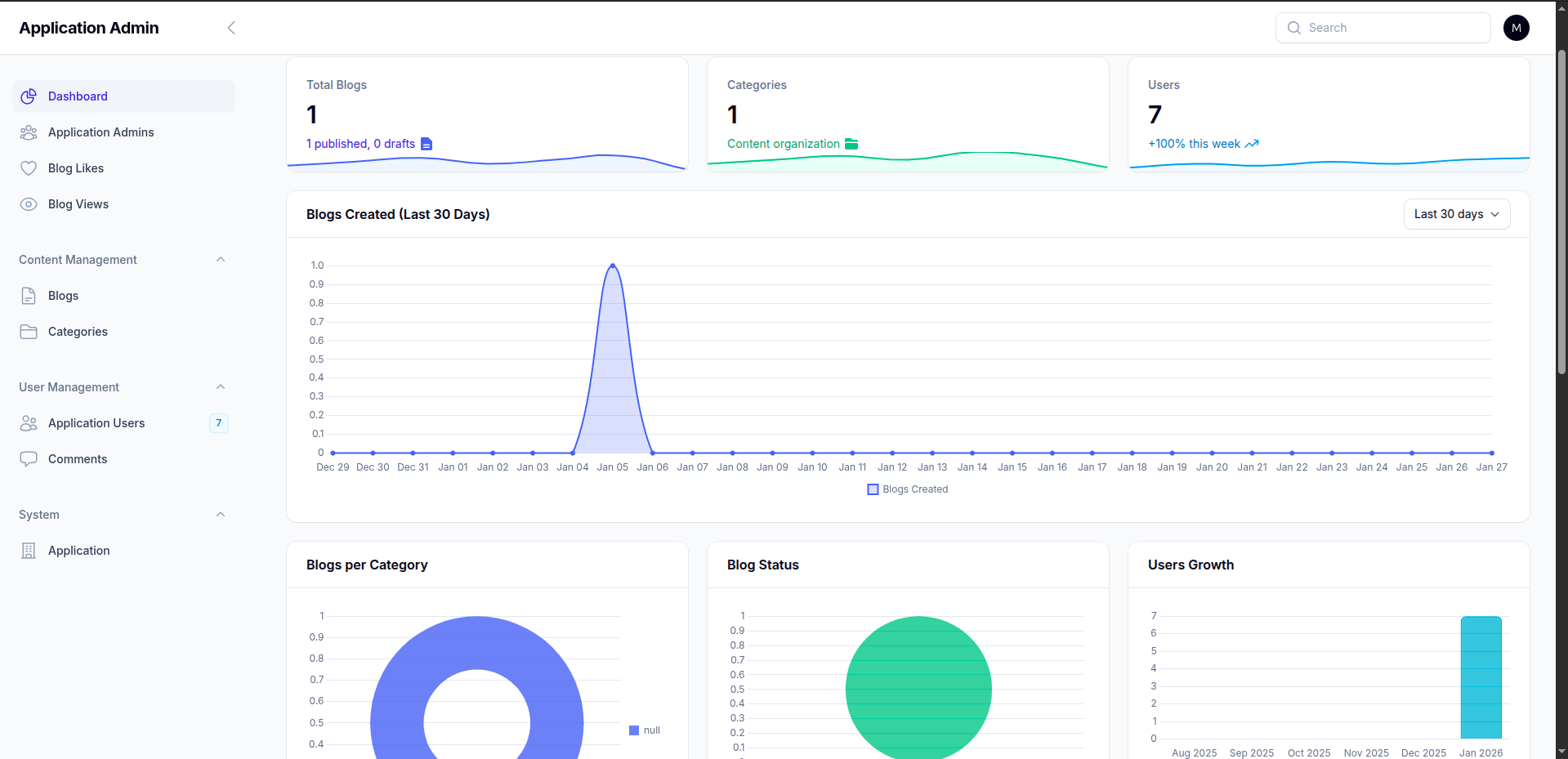
One Platform. Every Publishing Feature You Need.
From authentication and moderation to analytics and per-tenant theming, BlogForge ships a complete, production-grade toolkit - so your team doesn't have to stitch one together.
Identity & Access
03Flexible Tenant Sign-In
Connect each tenant to its own login page and rely on first-party session auth when a user is signed in. BlogForge no longer depends on bridge callbacks, signed cookie handoff, or auto-redirect auth.
Intelligent Guest Mode Access
Visitors can browse content without forced registration. Authentication is required only when they choose to engage, such as likes and comments.
Optional Two-Factor Authentication
Admins can enable TOTP-based two-factor authentication with backup recovery codes on both the Super Admin and Application Admin panels - opt-in, not forced, so every team sets its own security bar.
Publishing & Content
05Rich Publishing Workflow
Create polished articles with rich text editing, image uploads, SEO-friendly slugs, featured images, categories, tags, authors, and draft or published states.
Multilingual Content & Interface
Publish and manage content in multiple languages with locale-aware URLs, translatable slugs, RTL layout support, and a database-driven language registry.
Scheduled Publishing
Schedule articles to publish automatically at a future date and time. Content is queued and goes live without manual intervention when the scheduled time arrives.
Blog Series
Group related posts into an ordered series with automatic sidebar navigation, so readers can follow a multi-part story from start to finish without losing their place.
Advanced Content Discovery
Help readers find the right content faster with search, category filters, tag filters, and smarter related blog suggestions.
Engagement & Community
05Smart View Tracking
Views are counted uniquely: once per logged-in user (lifetime) and once per visitor (resets every 7 days via cookies).
Verified Likes
Like actions are restricted to logged-in users only, ensuring that every reaction represents a genuine, verifiable user.
Secure Commenting
Commenting requires authentication. This promotes higher quality discussions and prevents anonymous spam.
Multi-Type Reactions
Users can react to articles with Love, Neutral, or Dislike. Each reaction type is tracked separately per user, giving writers precise sentiment data beyond simple like counts.
Content Moderation Pipeline
Automatic comment filtering detects inappropriate content using a configurable word list. Supports auto-approve or manual review mode, keeping community quality high without extra overhead.
Multi-Tenancy & Branding
04Visual Theme Studio
Pick from ready-made themes or upload custom Blade templates per tenant through the Theme Studio - validated on save and swappable anytime from the admin panel or the signed API, with zero downtime.
Per-Tenant Branding
Customize each tenant with its own logo, brand colors, main site URL, and login flow to keep the blog experience aligned with your product identity.
Automated Provisioning API
Launch new blog tenants programmatically with built-in idempotency, audit logging, secure admin auto-login links, and replay-safe request handling.
Domain & SSL Management
Verify ownership, create tenants, and manage SSL certificate status from a centralized workflow designed for production-ready domain onboarding.
Admin & Analytics
05Backend Admin Pages
Built-in backend pages give application admins tenant-scoped control while super admins keep global visibility across applications, engagement metrics, and operational activity.
Weekly Engagement Analytics
Per-tenant weekly view stats are tracked and displayed in the admin dashboard, giving application owners a clear picture of audience growth and content performance trends.
GA4 & GTM Analytics Built In
Every view, like, comment, and login fires a structured Google Tag Manager event out of the box, with reader emails SHA-256 hashed before they ever leave the server - plug in your GA4 or Google Ads account and start measuring in minutes.
Auto Sitemap Generation
Per-tenant XML sitemaps are generated automatically as content changes and served with cache-backed delivery. Keeps your blog search-engine friendly out of the box.
SEO Redirect Protection
When a blog’s slug changes, the old URL is preserved in history and automatically redirected (301) to the new location. Published links never break.
Ship a Blog That Looks Like Your Product
Start from a ready-made theme, then go as far as you want - upload your own Blade templates per tenant through the Theme Studio and switch between them at any time.
Pick a theme
Assign any built-in theme to a tenant from the admin panel and see it live immediately.
Switch with zero downtime
Themes can be swapped from the admin panel or the signed API without redeploying anything.
Built to Pass a Security Review
Every tenant boundary, every API call, and every reader session is protected by defaults that are already in the code - not on a roadmap.
X-Api-Key:   your-tenant-api-key
X-Timestamp: 2026-09-23T11:48:00Z
X-Signature: hmac_sha256(
                "POST\n/api/blogs\n$ts\n$body",
                $tenant_secret_key
              )
Tenant secret keys never leave the server and are never rendered in any page.
Signed, Replay-Safe APIs
Every write to the platform API is authenticated with an HMAC-SHA256 signature over the method, path, timestamp and raw body. Requests older than five minutes are rejected, and signatures are compared in constant time.
Hard Tenant Isolation
Tenants are resolved from the request host by dedicated middleware, and admin panels are gated to the central domain. One application can never read or write another application's content.
Two-Factor for Admins
TOTP-based two-factor authentication with backup recovery codes is available on both the Super Admin and Application Admin panels, so every team can set its own bar.
Single-Use SSO Tokens
Direct sign-in accepts only short-lived HS256 tokens signed with the tenant secret. Each token carries a unique identifier that is consumed on first use, so a captured link cannot be replayed.
Privacy-Aware Analytics
Reader emails are SHA-256 hashed before any analytics event leaves the server, and known crawlers are filtered out of view counts so your numbers reflect real people.
Guarded Sessions & Links
CSRF protection covers every stateful form, admin preview links are cryptographically signed and expiring, and guests are tracked with a rotating visitor key instead of an account.
Ready to Launch Your Own Blog?
Spin up a fully branded, production-ready blog for your product in minutes - no infrastructure to manage.